Compare Things
The power of dynamic data-driven comparison tables.
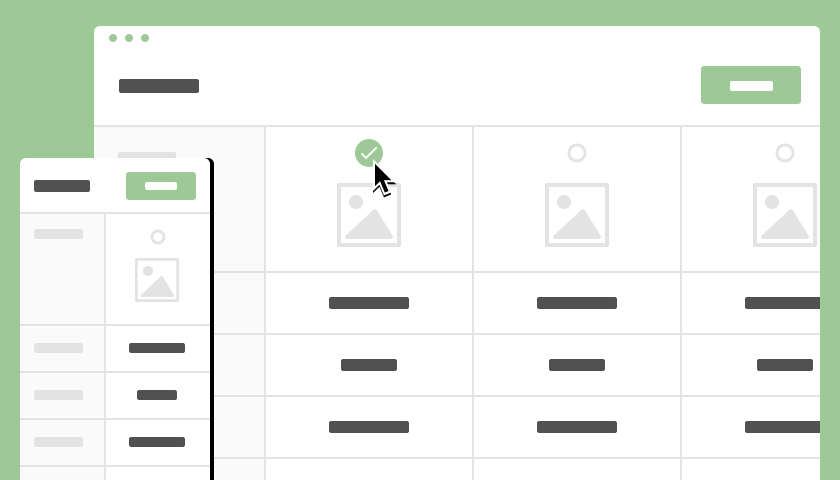
A dynamic plugin inspired by the concept and functionality of CodyHouse - Products Comparison Table, now enhanced with customization for colors and data-driven capability. Engineered to effortlessly display detailed comparison tables for your products/things, it offers tailor-made color options to match your brand and ensures full responsiveness across devices.
Consider supporting the maintenance and development with a small donation:
Key Features
Details & Instructions
- 1Install the Plugin: Simply add the Compare Things plugin to your Bubble.io project.
- 2Dependency: Ensure you have the Orchestra (repeating group addon) installed, especially if you're using dynamic data with the Compare Things plugin. Orchestra enhances the functionality of repeating groups, providing crucial support for dynamic data handling.
- Install Orchestra (repeating group addon) from the Bubble.io plugin marketplace.
- 3Configure Settings: Customize the plugin fields to match your requirements.
- Title: Set a title to display above the comparison table.
- Show Loader: Enable/disable the loader while the table is being generated.
- Activate Filtering: Choose whether to activate filtering options.
- Count: Specify the total number of items to compare.
- Wrapper Id: Paste the ID attribute of the element which will be replaced by the comparison table.
- Receive Data Id: Provide the ID attribute of the 'Receive Data' (Orchestra) element for dynamic data.
List of Names: Enter names of items in JSON format, ensuring they align with corresponding attributes and attribute values.Static Data
Each name must be wrapped inside double quotes
"name"and separated by comma."iPhone", "iPhone 3G", "iPhone 3GS", "iPhone 4", "iPhone 5", "iPhone 5c", "iPhone 5s", "iPhone 6"Dynamic Data
Each Orchestra - Receive Data item list must be formatted as
:formatted as JSON-safe.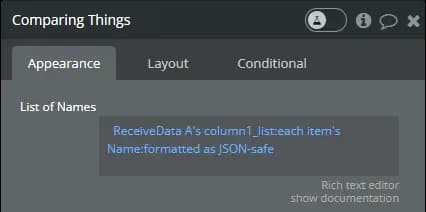 List of Images: Provide image paths in JSON format, keeping the same sequence as the list of names.
Static Data
Each path must be wrapped inside double quotes
"/cdn/my-image.jpg"and separated by comma."https://example.com/iphone-1.jpeg", "https://example.com/iphone-3g.jpeg", "https://example.com/iphone-3gs.jpeg", "https://example.com/iphone-4.jpeg", "https://example.com/iphone-5.jpeg", "https://example.com/iphone-5c.jpeg", "https://example.com/iphone-5s.jpeg", "https://example.com/iphone-6.jpeg"Dynamic Data
Each Orchestra - Receive Data item list must be formatted as
:formatted as JSON-safe.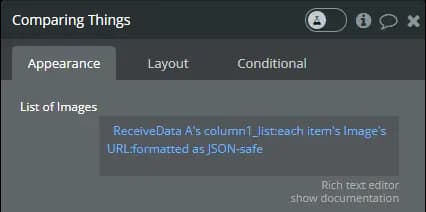 List of Links: Include links (optional) in JSON format, following the order of names and images.
Static Data
Each link must be wrapped inside double quotes
"https://www.link.com"and separated by comma."https://www.gsmarena.com/apple_iphone-1827.php", "https://www.gsmarena.com/apple_iphone_3g-2424.php", "https://www.gsmarena.com/apple_iphone_3gs-2826.php", "https://www.gsmarena.com/apple_iphone_4-3275.php", "https://www.gsmarena.com/apple_iphone_5-4910.php", "https://www.gsmarena.com/apple_iphone_5c-5690.php", "https://www.gsmarena.com/apple_iphone_5s-5685.php", "https://www.gsmarena.com/apple_iphone_6-6378.php"Dynamic Data
Each Orchestra - Receive Data item list must be formatted as
:formatted as JSON-safe.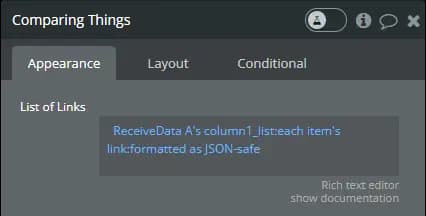
- Open Links New Tab: Specify if links should open in new tabs.
- Attributes & Attribute Values: Define attributes and their values, ensuring consistency with the order of names and other lists.
Static Data
List of Attributes must be wrapped inside double quotes and separated by comma.
"Camera, RAM, Storage, Battery, Processor, NFC"List of Attribute Values must be wrapped inside double quotes and each value separated by comma.
"1.9 megapixels, 128 MB, 4/8/16 GB, 1400 mA, S5L8900, No",
"1.9 megapixels, 128 MB, 8/16 GB, 1150 mA, S5L8900, No",
"3.1 megapixels, 256 MB, 8/16/32 GB, 1219 mA, S5L8920, No",
"8.0 megapixels, 512 MB, 8/16/32/64 GB, 1432 mA, S5L8940 A5, No",
"8.0 megapixels, 1 GB, 16/32/64 GB, 1434 mA, S5L8950 A6, No",
"8.0 megapixels, 1 GB, 16/32/64 GB, 1508 mA, S5L8950 A6, Yes",
"8.0 megapixels, 1 GB, 16/32/64 GB, 1508 mA, S5L8960 A7, Yes",
"8.0 megapixels, 1 GB, 16/64/128 GB, 1809 mA, T7000 A8, Yes"
Optionally, you can choose a different order for your attributes. They need to match the exact same names provided in the Attributes field, separated by comma.
Storage,
Processor,
RAM,
Camera,
Battery,
NFC
Dynamic Data
Each Orchestra - Receive Data item list must be formatted as
:formatted as JSON-safe.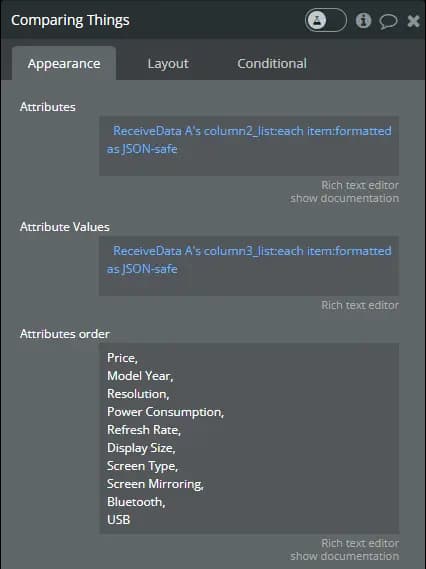
Optionally, you can choose a different order for your attributes, in case the order from Repeater Group does not suit your needs. They need to match the exact same names provided in the Attributes field, separated by comma.
Important! It's crucial to ensure that all lists maintain the same order to keep them synchronized. - 4Customize Colors: Tailor the appearance of your comparison table with our color customization fields:
- Table Colors: Main background, sidebar, border, and highlight colors.
- Buttons Colors: Text, default, hover, and disabled button colors.
- Functional Colors: Colors for checkmarks and error messages.
Tutorials
Master the setup and utilization of Compare Things with our tutorial videos. Whether you're working with static or dynamic data, these tutorials provide comprehensive guidance on optimizing your comparison tables. Watch now to streamline your data presentation and enhance your user experience.
Static Data
Dynamic Data
Feedback & Support
Have a question, suggestion, or encountering an issue with one of my plugins? I'm here to help! Use the contact form to submit any feedback or support inquiries, and I'll get back to you as soon as possible. Your input helps me improve and provide a better experience for all users.